Background Checks Overview
Purpose
Track, manage, and verify background checks and compliance documentation for all resources from member clubs. This comprehensive system monitors criminal background checks, authorization checks, training completion, and credentialing status.
Route
/manage/backgroundChecks
Screenshot
Description
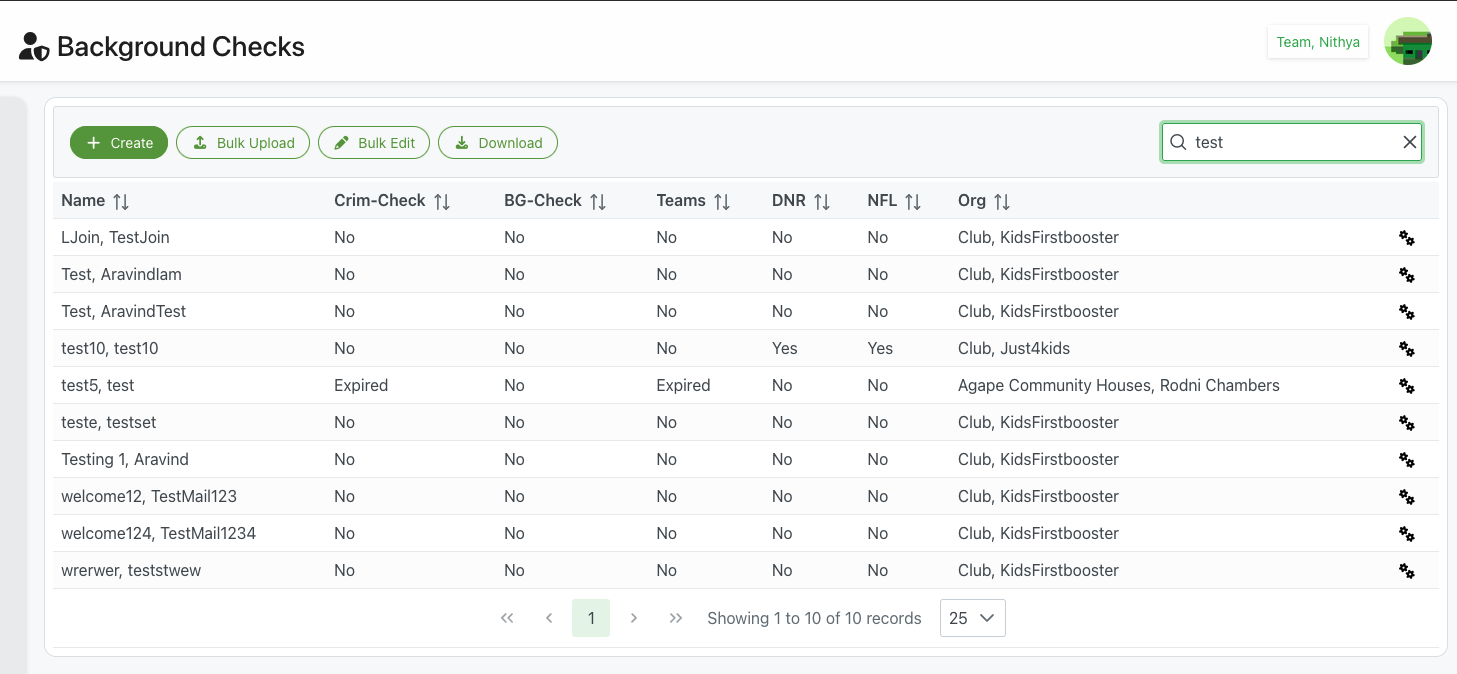
The Background Checks page provides a centralized system for managing compliance documentation and verification for all members and resources across your organization. This critical feature ensures safety, regulatory compliance, and eligibility tracking for personnel working with your organization.
Page Header
Title
- Icon: 👤 Person with checkmark icon
- Text: "Background Checks"
- Purpose: Compliance and verification management interface
- User Context: Current administrator in top-right (e.g., "Team, Nithya")
Action Buttons
+ Create (Green)
- Purpose: Add a new background check record
- Action: Opens background check entry form
- Use Cases:
- Recording new background check for new member
- Adding verification for existing member
- Manual entry of compliance documentation
- Creating record for volunteer or contractor
- See: Create/Edit Background Check for details
⬆ Bulk Upload (Outlined)
- Purpose: Import multiple background check records at once
- Icon: Upload arrow
- Action: Opens bulk upload dialog
- Format: Excel template-based upload
- Use Cases:
- Initial system setup with existing records
- Importing annual renewal data
- Batch updates from third-party screening service
- Large-scale compliance updates
- See: Bulk Upload for details
✏️ Bulk Edit (Outlined)
- Purpose: Edit multiple records simultaneously
- Icon: Pencil/edit icon
- Action: Opens bulk editing interface
- Features: Auto-save enabled inline editing
- Use Cases:
- Updating expiry dates in bulk
- Marking multiple checks as complete
- Batch status updates
- Mass compliance updates
- See: Bulk Edit for details
⬇ Download (Outlined)
- Purpose: Export background check data
- Format: CSV or Excel file
- Exported Data:
- All member information
- Check statuses and dates
- Expiry information
- Compliance status
- Use Cases:
- Compliance reporting
- Audit documentation
- External system integration
- Backup records
- Board reporting
Search Functionality
- Position: Top-right corner
- Placeholder: Search field
- Example Search: "test" shown in screenshot
- Real-time: Filters as you type
- Searchable Fields:
- Member names
- Organization names
- Check status
- Clear Button: ✕ icon to reset search
Background Checks Table
Comprehensive table displaying compliance status for all members.
Table Columns
Name ↕
- Content: Full name of the member/resource
- Format: "Last Name, First Name" or "Organization Name"
- Examples from screenshot:
- "LJoin, TestJoin"
- "Test, Aravindlam"
- "Test, AravindTest"
- "test10, test10"
- "test5, test"
- "teste, testset"
- "Testing 1, Aravind"
- "welcome12, TestMail123"
- "welcome124, TestMail1234"
- "wrerwer, teststwew"
- Sortable: Click header to sort alphabetically
- Action: Click to view/edit full record
Crim-Check ↕
- Content: Criminal background check status
- Values:
- "No": Check not completed
- "Yes": Check completed and current
- "Expired": Check completed but expired
- "Pending": Check in progress
- Sortable: Click to group by status
- Purpose: Track criminal history screening
- Compliance: Often required for working with minors or vulnerable populations
BG-Check ↕
- Content: General background authorization check status
- Values:
- "No": Authorization not obtained
- "Yes": Authorization current
- "Expired": Authorization expired
- "Pending": Authorization in review
- Sortable: Click to group by status
- Purpose: Additional authorization or screening beyond criminal check
- Use: May include employment verification, reference checks, etc.
Teams ↕
- Content: Teams training completion status
- Values:
- "No": Training not completed
- "Yes": Training completed and current
- "Expired": Training completed but expired
- "N/A": Training not required
- Sortable: Click to group by status
- Purpose: Track mandatory training completion
- Examples: Safety training, compliance training, role-specific training
DNR ↕
- Content: Do Not Recruit status
- Values:
- "No": Member is eligible for recruitment
- "Yes": Member is flagged as Do Not Recruit
- Sortable: Click to group by status
- Purpose: Flag individuals who should not be recruited or assigned
- Reasons:
- Previous policy violations
- Safety concerns
- Compliance issues
- Failed background checks
- Voluntary exclusion
NFL ↕
- Content: NFL Credentialed status (or other credential)
- Values:
- "No": Not credentialed
- "Yes": Currently credentialed
- "Pending": Credential in process
- "Expired": Credential expired
- Sortable: Click to group by status
- Purpose: Track special credentials or certifications
- Context: May vary by organization (NFL shown as example)
Org ↕
- Content: Member's organization affiliation
- Examples from screenshot:
- "Club, KidsFirstbooster"
- "Club, Just4kids"
- "Agape Community Houses, Rodni Chambers"
- Sortable: Click to sort by organization
- Purpose: Group members by their affiliated organization
- Use: Filter compliance by organization/club
Actions (⚙)
- Icon: Gear/settings icon
- Purpose: Access member-specific actions
- Click: Opens context menu
- Common Actions:
- Edit background check details
- View full record
- Update expiry dates
- Mark checks complete
- Add notes
- Generate report
- Delete record
Compliance Status Indicators
Check Status Values
No / Not Completed
- Meaning: Check has not been performed or documented
- Color: Typically default/gray text
- Action Needed: Initiate background check process
- Priority: High if required for role
Yes / Completed
- Meaning: Check is current and valid
- Color: May show in green or standard text
- Action Needed: Monitor expiry date
- Priority: Maintain compliance
Expired
- Meaning: Check was completed but has expired
- Color: Often red or warning color
- Action Needed: Renew or update check immediately
- Priority: Urgent - affects eligibility
- Example from screenshot: "test5, test" shows Expired for Crim-Check and Teams
Pending
- Meaning: Check is in progress
- Action Needed: Monitor for completion
- Priority: Medium - track timeline
Pagination Controls
Navigation
- ⏮ First Page: Jump to first page
- ◀ Previous: Go to previous page
- Page Number: Current page (highlighted in green)
- ▶ Next: Go to next page
- ⏭ Last Page: Jump to last page
Information Display
- Record Count: "Showing 1 to 10 of 10 records"
- Format: "Showing [start] to [end] of [total] records"
- Purpose: Context of current view
Page Size Selector
- Default: 25 records per page
- Options: Dropdown with choices (10, 25, 50, 100, All)
- Use: Adjust display density for large datasets
Background Check Types
Criminal Background Check (Crim-Check)
- Purpose: Screen for criminal history
- Required For: Most roles, especially working with minors
- Frequency: Annual or per organizational policy
- Scope: May include:
- County, state, or federal records
- Sex offender registry check
- Driving record (if applicable)
- Court records
Background Authorization (BG-Check)
- Purpose: General authorization and screening
- Components: May include:
- Identity verification
- Employment history
- Education verification
- Professional references
- Credit check (for financial positions)
- Frequency: Based on organizational requirements
Teams Training
- Purpose: Mandatory training completion tracking
- Training Types:
- Safety and security training
- Child protection training
- Code of conduct
- Role-specific training
- Annual compliance training
- Tracking: Completion dates and expiry dates
Do Not Recruit (DNR)
- Purpose: Flag ineligible individuals
- Reasons for DNR:
- Failed background check
- Policy violations
- Safety incidents
- Compliance breaches
- Voluntary exclusion
- Legal restrictions
- Effect: Prevents assignment to roles
NFL Credentialed (or Special Credentials)
- Purpose: Track special certifications
- Examples:
- Professional certifications
- Industry credentials
- Security clearances
- Specialized training certificates
- Venue-specific credentials
Use Cases
Initial Setup - Adding Background Checks
Scenario: Recording background checks for existing members
Process:
- Click + Create for individual entry, or
- Click Bulk Upload for multiple records
- Enter or import member information
- Record check statuses and dates
- Upload supporting documentation
- Save records
- Verify accuracy in table
Monitoring Compliance Status
Scenario: Regular compliance review
Process:
- Access Background Checks page
- Sort by check type to review statuses
- Identify expired or missing checks
- Filter by organization if needed
- Export report for management review
- Flag members needing updates
- Follow up on non-compliant members
Renewing Expired Checks
Scenario: Annual background check renewal
Process:
- Filter or search for expired checks
- Identify members needing renewal
- Initiate renewal process with members
- Use Bulk Edit for mass updates
- Update expiry dates as checks complete
- Verify all members are current
- Generate compliance report
Flagging Ineligible Members
Scenario: Member fails background check
Process:
- Locate member record
- Click gear icon (⚙) to edit
- Update check status (e.g., set DNR to "Yes")
- Add notes explaining situation
- Save changes
- Member automatically excluded from assignments
- Document decision and notify stakeholders
Onboarding New Members
Scenario: Adding background check for new member
Process:
- Click + Create button
- Enter personal information
- Initiate background checks
- Mark checks as "Pending"
- Update to "Yes" when completed
- Record expiry dates
- Member eligible for assignments once complete
Compliance Reporting
Scenario: Generating compliance report for board
Process:
- Optional: Filter by organization or status
- Click Download button
- Select export format
- Open in spreadsheet
- Analyze compliance rates
- Identify gaps or issues
- Present findings to stakeholders
Best Practices
Documentation Management
Record Keeping
- Complete Records: Ensure all fields populated
- Accuracy: Verify dates and statuses carefully
- Timeliness: Update records promptly
- Documentation: Keep supporting documents
- Audit Trail: Maintain history of changes
Data Quality
- Regular Reviews: Audit records quarterly
- Expiry Monitoring: Track approaching expiry dates
- Status Updates: Keep statuses current
- Verification: Confirm checks with members
- Corrections: Fix errors immediately
Compliance Monitoring
Proactive Management
- Advance Warnings: Monitor expiry dates 30-60 days ahead
- Renewal Reminders: Notify members of upcoming renewals
- Batch Processing: Schedule annual renewal periods
- Follow-Up: Track pending checks actively
- Reporting: Generate regular compliance reports
Risk Management
- Priority Checks: Ensure critical roles always current
- DNR Enforcement: Strictly enforce Do Not Recruit flags
- Expired Handling: Suspend assignments for expired checks
- Documentation: Maintain thorough records for liability protection
- Policy Compliance: Follow organizational and legal requirements
Privacy and Security
Sensitive Data Handling
- Access Control: Limit who can view background checks
- Confidentiality: Treat check results as confidential
- Secure Storage: Store supporting documents securely
- Data Protection: Follow privacy regulations (GDPR, etc.)
- Disposal: Properly dispose of old records per policy
Legal Compliance
- Consent: Obtain proper consent before checks
- Fair Credit Reporting Act (FCRA): Comply with FCRA if applicable
- State Laws: Follow state-specific requirements
- Disclosure: Provide required disclosures to members
- Adverse Action: Follow proper procedure if denying based on check
Communication
Member Communication
- Clear Expectations: Explain requirements upfront
- Process Transparency: Keep members informed of status
- Renewal Notices: Provide advance warning of expiries
- Results: Communicate check results appropriately
- Support: Assist members with process
Stakeholder Updates
- Regular Reports: Provide compliance status to leadership
- Issue Escalation: Report serious concerns promptly
- Trend Analysis: Share compliance trends
- Policy Updates: Communicate policy changes
- Training: Educate staff on procedures
Related Features
- Create/Edit Background Check - Add or modify individual records
- Bulk Edit - Edit multiple records simultaneously
- Bulk Upload - Import multiple records at once
- Members Management - Member information management
- Teams Management - Team assignments and compliance
Tips
- Proactive Monitoring: Set up calendar reminders for expiry dates 30-60 days in advance
- Batch Processing: Schedule annual renewal periods to process many checks efficiently
- Use Bulk Tools: Leverage bulk edit and upload for large-scale updates
- Regular Exports: Download compliance reports monthly for records
- Clear DNR Flags: Ensure DNR status is used consistently and documented
- Training Tracking: Integrate training completion with background check records
- Vendor Integration: If using third-party screening, explore data import options
- Audit Trail: Document all changes and maintain historical records
- Policy Documentation: Keep policies updated and communicate clearly to all members
- Legal Review: Have background check policies reviewed by legal counsel annually